Reviewed September 2026: control descriptions and product facts re-verified against current QuickUpload behavior.
Why Secure File Sharing Matters More in 2026
Every week brings another headline about leaked documents, exposed client data, or a misconfigured cloud bucket. The way most people share files online has not kept up. A link gets pasted into an email, that email gets forwarded, the link ends up in a group chat, and suddenly a document intended for one person is effectively public.
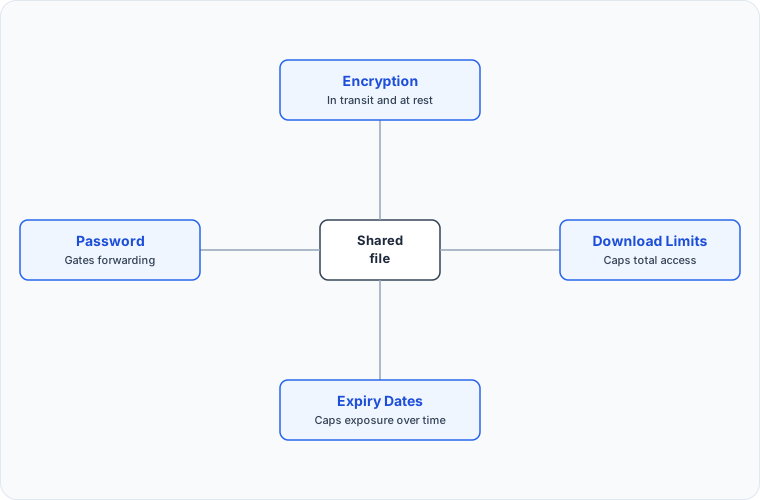
Secure file sharing is the practice of closing those gaps. It means knowing who can open your files, for how long, and what happens to the link when you no longer need it. This guide walks through the four controls that actually matter — encryption, passwords, expiry, and download limits — how they work together, and how to apply them without making sharing painful.
The Threat Model: What You Are Actually Protecting Against
Before choosing tools, it helps to know what you are protecting against. Four scenarios cover most real-world file sharing incidents:
Link forwarding. You send a file to one person, and the link travels further than you intended. Every forward is a copy of your access control decision that you cannot revoke.
Link indexing. Public links can be discovered by crawlers and end up in search results or link-preview databases, making private documents findable by strangers.
Indefinite exposure. A link that works forever is a liability that compounds. The file you shared "just for this week" is still downloadable three years later, long after the project ended and the NDA expired.
Storage-side access. Even with an encrypted connection, many services store files in plain form. Anyone with access to the storage layer — an employee, an attacker, a misconfiguration — can read them.
Good secure file sharing addresses all four: passwords gate forwarding, proper robots hygiene and password protection prevent indexing, expiry dates cap exposure over time, and encryption at rest protects against storage-side access.
The Four Controls That Matter
1. Encryption, in transit and at rest
Encryption has two halves. In transit encryption protects your file while it moves between your browser and the server — the padlock in the address bar. At rest encryption protects it while it sits in storage.
The second half is the one people forget to check. Plenty of services encrypt the connection and then write your file to disk in plain form, where anyone with access to the storage layer can read it. When you evaluate a file sharing service, look for language covering both: files encrypted during transfer and storage.
Quickupload encrypts files both in transit and at rest, on every upload, on every plan. There is no toggle to forget to switch on and no paid tier to buy into — a freelancer sending a contract gets the same protection as an enterprise account moving a database export. For background on how the different encryption models compare, read our end-to-end encryption explainer.
2. Password protection
A link alone is a bearer token: whoever holds it, gets in. Adding a password means the recipient needs both the link and something you share over a separate channel.
This is the single most effective defense against link forwarding. A forwarded email or a link pasted into the wrong Slack channel is no longer automatically a leak — the recipient still cannot open the file without the password.
Practical rules that make passwords work:
- Share the password over a different channel than the link (email the link, text the password)
- Never reuse passwords across files
- For one-time sends, pair the password with a short expiry so stale links die quickly
Quickupload includes password protection on every plan, including the free tier — it is a security feature, not an upsell. Our password-protected file sharing guide covers setup and best practices in detail.
3. Expiry dates
Every file you share should have a lifespan. Expiry dates turn "available forever" into "available until Friday," which means old links stop being a standing liability.
The right expiry depends on the use case. A one-off handoff needs hours, not days. Client deliverables under review need a window that matches the review period. Compliance-sensitive material often needs a documented, automatic cutoff.
With Quickupload, files expire automatically: 24 hours on the free plan, 30 days on Pro, 90 days on Enterprise, and Pro plans and above can set custom expiry dates for an exact cutoff. When a link dies, it is dead — there is no zombie copy sitting in someone's inbox still resolving to your file. Curious what actually happens behind the scenes when a file expires? We traced the full lifecycle in what happens to expired files.
4. Download limits
Where expiry caps a link's lifespan in time, download limits cap it in usage. Set a file to three downloads and the link burns after the third — nothing left to forward, index, or stumble onto later.
Download limits shine for targeted distribution: a recruiter sending a portfolio to a hiring panel of four sets a limit of four; an agency sharing comps with one client sets a limit of one or two. Combined with a password, you get two independent gates on the same file.
On Quickupload, download limits are available on Pro and Enterprise plans, and they can also be set per upload through the REST API alongside expiry and password options.
Choosing a Secure File Sharing Tool in 2026
With the four controls in mind, here is a practical checklist for evaluating any file sharing service — Quickupload included:
| Question | Why it matters |
|---|---|
| Is encryption in transit AND at rest? | At-rest is the half most services skip |
| Is password protection on the free tier? | If it is paywalled, most shares will go out without it |
| Can you set expiry dates? | Links that live forever accumulate risk |
| Can you cap downloads? | Usage-based control complements time-based expiry |
| Can you track downloads? | Knowing a file was never opened changes your follow-up |
| Is there an API with scoped keys? | Matters if uploads become part of your product or workflow |
Two more factors that are easy to underestimate:
Friction. Every extra step between "I need to send this" and "sent" is a tax, and taxes push people toward insecure shortcuts. The best security is the kind people actually use. That is why Quickupload lets you start uploading without an account — drag, drop, share — with the security options attached to the upload, not buried in settings.
Total cost. Security features locked behind expensive tiers end up unused. Quickupload's pricing keeps password protection and encryption on the free plan and reserves the heavier limits — larger files, longer expiry, API access — for paid tiers.
Secure File Sharing for Different Roles
Freelancers and creatives deliver client work constantly. The pattern that works: password on, expiry matched to the review window, download limit matched to the number of reviewers. Your deliverable stops being findable the moment the project closes.
Teams and businesses share contracts, decks, and exports. The controls matter more as the audience grows, because every additional recipient multiplies forwarding risk. Setting defaults — always a password, always an expiry — beats deciding fresh each time.
Developers should treat file sharing as part of the security surface. Quickupload's REST API supports per-upload passwords, expiry, and download limits, with API keys carrying scoped permissions so an integration that only reads files never gets delete rights.
Compliance: GDPR, HIPAA-Adjacent, and Data Minimization
If you handle personal data, secure sharing is not just good hygiene — it is a legal expectation. GDPR's data minimization principle asks that personal data be kept no longer than necessary for its purpose. A file sharing link with no expiry is the opposite of that: personal data retained indefinitely by default.
Expiry dates and download limits map naturally onto compliance requirements. An automatic 30-day cutoff on shared documents is easier to defend in an audit than "we relied on everyone to delete their emails." Password protection supports the access-control expectations in frameworks like GDPR and, in the US context, the safeguards HIPAA-adjacent workflows expect — even outside formally covered systems, health and financial documents deserve the same treatment.
None of this makes a file sharing tool a compliance certification on its own. What it does is remove the most common failure mode: data that outlives its purpose because deleting it was someone's manual job. We cover the regulatory angle in more depth in the GDPR compliance file sharing guide.
Secure Sharing vs. Email Attachments
Email deserves a special mention because it remains the default file transfer method for most people, and it fails quietly on every control in this guide:
- No expiry. An attachment lives in both mailboxes forever, plus every server it transited.
- No access control. Anyone who gains access to either mailbox — through a compromised account or a forwarded thread — gets the file.
- Size limits. Most providers cap attachments around 25 MB, pushing people toward riskier workarounds like personal cloud drives with public links.
- No tracking. You cannot tell whether the attachment was opened, downloaded, or forwarded.
The secure pattern is to keep the document out of the email entirely: send a link with a password and an expiry instead. The email becomes a pointer, not a copy. If size is what drove you to attachments in the first place, how to send large files via email compares the practical options.
A Five-Minute Secure Sharing Checklist
Next time you share a file, run through this:
- Does the file need a password? If it contains anything you would not post publicly, yes.
- When should this link die? Pick the shortest reasonable window, not the longest convenient one.
- How many people need it? If the answer is a specific number, set a download limit to match.
- Is the connection and storage encrypted? Check once for the tool you use, not every time you share.
- Did it land? Download tracking tells you whether to follow up — file analytics is included.
The Bottom Line
Secure file sharing in 2026 is not about paranoia — it is about defaults. Encryption in transit and at rest, passwords on shares, expiry on links, and caps on downloads: four controls that take seconds to apply and eliminate most of the ways shared files leak. Choose a tool that makes them the easy path rather than the premium option, and the security takes care of itself.
Try it now: upload a file at quickupload.io, add a password and an expiry, and see how little friction real security adds.